📌Key Takeaways
- Smart home devices reduce fall risk by automating lighting and monitoring
- Voice control makes technology accessible for those with limited mobility
- Smart thermostats can save energy and improve comfort
- Home security devices provide peace of mind for seniors and caregivers
- Most devices are easy to set up with help from family or tech support
The Smart Home Journey
The version of a smart home that actually serves an older adult isn't the one from the tech commercials. It's a hall light that comes on by itself at 2 a.m., so nobody crosses a dark room searching for a switch. It's a voice speaker in the kitchen that doubles as an intercom to one in the bedroom, and a door contact sensor that texts a daughter across town when Dad's morning routine hasn't registered by late morning. It's a video doorbell that answers the door from a chair instead of on foot.
None of this calls for coding. These devices plug in, join the home Wi-Fi through a phone app, and then take voice commands — and the setup is genuinely the part to ask for help with, whether that's a family member with an afternoon free or a paid installation service. Below are the device categories worth considering, what each one does in a normal day, and how to begin with a single device instead of rewiring the whole house.
Smart Home Statistics
72% of seniors say smart home devices make them feel more independent. 85% report feeling safer with smart security devices installed.
What Are Smart Home Devices?
Understanding Smart Technology
Smart home devices are connected devices that can be controlled remotely or through voice commands. They connect to your home Wi-Fi network and can be managed through a smartphone app or voice assistant like Amazon Alexa or Google Assistant.
Why Smart Home Devices Matter for Seniors
Smart home technology can:
- Cut down on falls and panic: Automatic lighting, fall detection, emergency alerts
- Remove trips and reaching: Voice control, remote access
- Save energy: Smart thermostats, automated lighting
- Keep family in the loop: Security cameras, video doorbells
- Simplify daily tasks: Voice reminders, automated routines
The shift worth noticing is who adapts to whom. Instead of learning menus and button combinations, you speak the way you would to anyone in the room, and the device handles the rest.
Types of Smart Home Devices
1. Safety and Security Devices
These are the devices that answer the door without standing up, lock the house without keys, and route trouble straight to someone's phone.
Smart Doorbells:
- See who's at the door from anywhere
- Two-way audio to talk to visitors
- Motion detection alerts
- Video recording for security
Ring Video Doorbell Smart Home Security
See and speak to visitors from anywhere with motion-activated alerts, two-way audio, and video recording for added home security.
Motion Sensors:
- Detect movement in the home
- Can trigger lights to turn on automatically
- Send alerts to your phone if unusual activity is detected
- Help monitor loved ones remotely
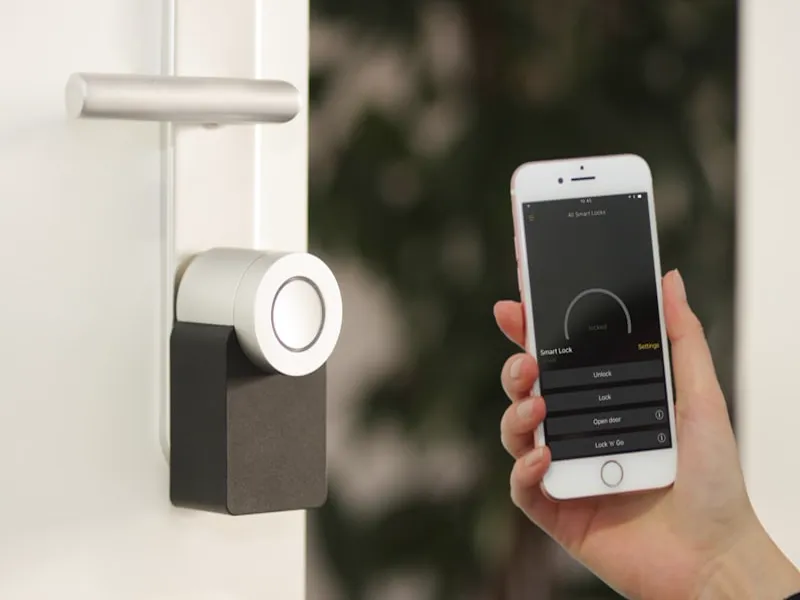
Smart Locks:
- Lock/unlock doors remotely
- Create temporary codes for caregivers or visitors
- Receive alerts when doors are opened/closed
- No more lost keys
Smart Smoke/Carbon Monoxide Detectors:
- Send alerts to your phone when smoke or CO is detected
- Can alert multiple people simultaneously
- Some have built-in speakers for voice alerts
Security Cameras:
- Monitor your home from anywhere
- Night vision for 24/7 monitoring
- Two-way audio
- Motion-activated recording
A common setup pairs the doorbell with a camera or two, so a family member can glance at a live feed when a call goes unanswered — checking in without the daily phone chain.
2. Lighting Control
Most nighttime trips to the bathroom involve crossing at least one dark room. Smart lighting eliminates the search for the switch.
Smart Bulbs:
- Control lighting with voice commands or phone app
- Dim or brighten lights without reaching for switches
- Set schedules for automatic on/off
- Change colors for different moods

Philips Hue White A19 Smart Bulb 2-Pack
Dimmable white smart bulbs you can control with voice commands or app, perfect for setting schedules and reducing fall risk at night. 2-pack.
Smart Light Switches:
- Replace existing light switches
- Control multiple lights at once
- Schedule lights to turn on at sunset
- Voice control compatible
Motion-Activated Lights:
- Turn on automatically when motion is detected
- Perfect for hallways, bathrooms, and stairs
- Reduce fall risk by ensuring well-lit paths
Motion sensors in the hallway and bathroom earn their keep between bedtime and morning: feet hit the floor and the route to the bathroom is lit before a hand reaches a wall.
3. Climate Control
A smart thermostat replaces the walk to the hallway dial with voice or app control, and it quietly stops heating rooms nobody is using.
Smart Thermostats:
- Learn your temperature preferences
- Adjust automatically based on your schedule
- Control remotely from your phone
- Save money on energy bills
Ecobee Smart Thermostat Enhanced
Learns your temperature preferences, adjusts automatically to your schedule, and saves on energy bills with easy voice control and remote app access.
Features to Look For:
- Easy-to-read display
- Voice control compatibility
- Energy-saving modes
- Vacation mode for when you're away
What people tend to notice first is the learning behavior: the house warms before the usual wake-up time and eases back at night, on a schedule nobody had to program by hand.
4. Voice Assistants
A voice speaker is the cheapest piece of the system and the one that makes everything else work hands-free. With units in two rooms, they also serve as room-to-room intercoms, so a bedroom reaches the kitchen without anyone raising their voice.
Amazon Alexa:
- Control smart devices with voice commands
- Play music, news, and audiobooks
- Set reminders and alarms
- Answer questions

Amazon Echo Dot 5th Gen Smart Speaker with Alexa
Compact smart speaker with Alexa to control devices, play music, set medication reminders, and ask questions using just your voice.
Google Assistant:
- Similar features to Alexa
- Tighter integration with Google services
- Good for Android users
Apple HomePod:
- Works seamlessly with Apple devices
- Excellent sound quality
- Privacy-focused
In daily use, lights, medication reminders, weather, and music all run through the same kind of sentence-length command — no menus, no finding the right button.
5. Convenience Devices
This category handles the small repeated motions — reaching for a switch, wondering whether an appliance was left on, waiting for coffee to brew.
Smart Plugs:
- Control any appliance from your phone
- Turn off devices remotely (no more worrying if you left the coffee maker on)
- Schedule devices to turn on/off automatically
- Monitor energy usage

Amazon Smart Plug Works with Alexa
Turn any appliance on or off with voice commands or app, schedule coffee makers, and never worry about leaving devices on again.
Smart Speakers:
- Play music, podcasts, and audiobooks
- Set timers and alarms
- Get news and weather updates
- Control other smart devices
Smart Kitchen Devices:
- Smart coffee makers: Brew coffee at a scheduled time
- Smart ovens: Preheat and monitor cooking remotely
- Smart refrigerators: Create shopping lists and monitor contents
Smart Beds:
- Adjustable beds with voice control
- Temperature control
- Sleep tracking
- Gentle wake-up lights
A smart plug on the coffee maker turns a bedtime tap into a morning routine, and the same plug can cut power to a forgotten iron or space heater from across town.
6. Health and Wellness Devices
These are the devices that stand in for the check-in phone call and the medication routine.
Smart Pill Dispensers:
- Dispense medication at scheduled times
- Send reminders when it's time to take medicine
- Alert caregivers if doses are missed
- Some have video calls built-in
Fall Detection Devices:
- Wearable devices that detect falls
- Automatic alert to emergency contacts
- GPS tracking for outdoor use
- Some include two-way communication
Smart Scales:
- Track weight, BMI, and body composition
- Sync with health apps
- Share data with caregivers or doctors
- Visual feedback on progress
Connected pill dispensers beep at dose time, but the more useful feature is the message that goes to a designated contact when a dose is missed — the device's real job is providing that second pair of eyes.
Smart Home Device Categories
Choose devices based on your specific needs
- •Safety/Security: Video doorbells, motion sensors, smart locks
- •Lighting: Smart bulbs, motion-activated lights
- •Climate: Smart thermostats
- •Voice Assistants: Alexa, Google Assistant
- •Health: Pill dispensers, fall detectors
Choosing the Right Devices
Step 1: Identify Your Needs
Think about what tasks are most challenging:
- Do you struggle with turning on lights?
- Do you worry about security?
- Do you need help remembering to take medication?
- Do you want to save energy?
Step 2: Start Small
You don't need to smarten your entire home at once. Start with one or two devices that solve a specific problem.
Recommended First Devices:
- Voice assistant (Alexa or Google Home)
- Smart bulb or smart plug
- Video doorbell
A sensible sequence: start with one device — a smart bulb, then a voice speaker — and add the next one only after the first feels routine.
Step 3: Consider Ease of Use
Look for devices that:
- Have simple setup processes
- Offer voice control
- Have large, easy-to-read displays
- Don't require complicated apps
Step 4: Check Compatibility
Make sure devices work together:
- Most devices work with Alexa, Google Assistant, or Apple HomeKit
- Check product descriptions for compatibility
- Stick with one ecosystem if possible (e.g., all Alexa-compatible devices)
Step 5: Get Help Setting Up
Don't hesitate to ask for help:
- Family members or caregivers can help with setup
- Many companies offer setup services
- Some senior centers offer technology workshops
Setting Up Your Smart Home
Basic Setup Steps
- Connect to Wi-Fi: Most devices require a 2.4GHz Wi-Fi connection
- Download the app: Each device usually has its own app for setup
- Follow instructions: Most apps have step-by-step guides
- Connect to voice assistant: Link devices to Alexa, Google Assistant, or Siri
- Test the device: Make sure it works before relying on it
Tips for Success
- Start with the basics: Set up one device at a time
- Write down passwords: Keep track of Wi-Fi passwords and app logins
- Label devices clearly: Give devices simple names like "living room light"
- Practice voice commands: Start with simple commands like "turn on the light"
- Ask for help: Don't be afraid to ask family or tech support for assistance
Realistically, the first afternoon works best as a two-person job: one person downloads the apps, joins each device to the Wi-Fi, and gives it a plain name like "hallway light," while the person who'll use it daily practices the few commands that matter. After that, day-to-day use is almost entirely voice.
Safety Considerations
Privacy and Security
- Choose reputable brands: Stick with well-known companies
- Keep software updated: Enable automatic updates
- Use strong passwords: Create unique passwords for each device
- Review privacy settings: Understand what data is collected
- Disable features you don't need: Turn off unnecessary permissions
Emergency Preparedness
- Test devices regularly: Make sure smoke detectors and emergency alerts work
- Have backup plans: Don't rely solely on smart devices
- Keep emergency contacts updated: Ensure devices have current contact information
- Consider a medical alert system: Smart devices are not a replacement for medical alerts
Cost Considerations
Budgeting for Smart Home Devices
Price Range:
- Smart bulbs: $10-$20 each
- Smart plugs: $15-$30 each
- Voice assistants: $50-$100
- Smart thermostats: $100-$250
- Video doorbells: $100-$200
- Security cameras: $50-$200 each
Cost-Saving Tips:
- Start with affordable devices (smart bulbs, plugs)
- Look for sales and discounts
- Consider refurbished devices
- Share costs with family members
A smart bulb plus a voice assistant delivers most of the everyday benefit for less than a week in an assisted-living facility, and you add devices only when a specific need shows up.
Real Stories: Smart Home Success
The fall-detector wearer: a pendant or watch senses the fall and automatically dials through the emergency contact list — often before the person on the floor could reach a phone — while motion lights make the nighttime route safer to begin with.
The thermostat household: temperatures change by voice from a chair, and scheduled setbacks quietly trim the utility bill without anyone thinking about it.
The doorbell-and-camera family: relatives check the feed after a missed call instead of driving over, and the door gets answered by someone who never has to stand up.
FAQ: Smart Home Devices for Seniors
Q: Are smart home devices difficult to set up? A: Most devices are designed to be easy to set up. Many have step-by-step apps, and family members can help.
Q: Do I need a smartphone to use smart home devices? A: No! Many devices can be controlled with voice commands alone. Some have simple remotes or touchscreens.
Q: Are smart home devices secure? A: Reputable brands take security seriously. Use strong passwords and keep software updated.
Q: How much do smart home devices cost? A: Prices range from $10 for smart bulbs to $250 for advanced thermostats. You can start small and add more devices over time.
Q: Can smart home devices help with memory issues? A: Yes! Voice assistants can set reminders, and smart pill dispensers can help with medication management.
Q: What if I lose power or Wi-Fi? A: Most smart devices have battery backups or will work manually if power is out. Some have cellular backup options.
Q: Can I control smart devices when I'm away from home? A: Yes! Most devices can be controlled remotely through smartphone apps.
Conclusion: Arthur's Smart Home Journey
The pattern in these setups is remarkably consistent. One device solves one specific annoyance — usually a light or a voice speaker — and confidence grows from there. People don't keep using these products because they have become technology enthusiasts; they use them because getting up, reaching, and remembering gradually got harder, and the devices quietly absorbed part of that work.
Smart home devices aren't about being "tech-savvy." The two decisions that actually matter are picking one real problem to start with and asking for an hour of help with the initial setup.
Your Smart Home Action Plan
1. Identify one task you want to simplify (e.g., turning on lights, remembering medication). 2. Choose one device that solves that problem. 3. Ask family or a tech-savvy friend to help set it up. 4. Practice using it until you're comfortable. 5. Add more devices as you need them!
Additional Resources for Smart Home Seniors
Organizations That Can Help
1. AARP Technology Resources
- Offers guides and workshops on using technology
- Senior-friendly tech tips and reviews
- Website: aarp.org/technology
2. Senior Planet
- Free tech classes for seniors
- In-person and online workshops
- Website: seniorplanet.org
3. Consumer Reports
- Reviews of smart home devices
- Ratings for ease of use and reliability
- Website: consumerreports.org
4. Area Agencies on Aging
- Local resources for seniors
- May offer tech assistance programs
- Find your local agency: eldercare.gov
Tips for Getting Started
Start Small:
- Don't try to set up everything at once
- Begin with one simple device
- Practice using it until you're comfortable
Ask for Help:
- Family members are often happy to help
- Many tech stores offer setup assistance
- Consider hiring a tech-savvy neighbor or handyman
Take it Slow:
- Learn one feature at a time
- Write down instructions if needed
- Don't hesitate to ask questions
Arthur's Favorite Smart Home Features
After a few months, the devices people actually keep using are rarely the flashy ones. The voice speaker handles reminders and weather; the thermostat trims the energy bill on its own schedule; the motion lights make nighttime trips unremarkable.
The family-facing side matters just as much. A camera feed answers the question when a parent doesn't answer the phone, and a smart plug can kill a stove that was left on from miles away — reassurance that runs in both directions.
Common Smart Home Mistakes to Avoid
1. Overcomplicating Things:
- Don't buy more devices than you need
- Stick to simple, easy-to-use devices
- Focus on solving specific problems
2. Ignoring Security:
- Use strong, unique passwords
- Enable two-factor authentication when available
- Keep devices updated with the latest software
3. Not Reading Instructions:
- Take time to read the user manual
- Watch tutorial videos if available
- Ask for help if something isn't working
4. Forgetting About Privacy:
- Understand what data your devices collect
- Adjust privacy settings to your comfort level
- Delete data you don't need
Smart Home Safety Checklist
✓ Use strong passwords ✓ Enable automatic updates ✓ Review privacy settings ✓ Test devices regularly ✓ Keep emergency contacts updated ✓ Have a backup plan for power outages
Always ask for help setting up new devices if you need it. This article is for informational purposes only and does not constitute medical advice.